
The Complete Guide to No-Code Development for Businesses

Building custom software has traditionally required significant time, technical expertise, and investment. Today, businesses need faster and more efficient ways to build digital solutions without compromising functionality. No-code development addresses this challenge by enabling organizations to create applications using visual development platforms instead of extensive coding. As digital transformation accelerates across industries, no-code has become a practical solution for improving operational efficiency, reducing development complexity, and bringing applications to market faster.
No-code development is an excellent solution for many business applications, but the right development approach ultimately depends on your business goals, application complexity, and long-term requirements.
In this guide, you'll discover:
- What Is No-Code Development?
- How Does No-Code Development Work?
- Benefits of No-Code Development
- Common Use Cases for No-Code Development
- When Is No-Code Development Not the Right Choice?
- Is No-Code Development Right for Your Business?
Whether you're exploring no-code for the first time or evaluating it for your next project, this guide will help you make a more informed decision.
What Is No-Code Development?
No-code development is a software development approach that enables users to build applications using visual drag-and-drop tools instead of writing traditional code. Rather than programming every feature manually, developers create applications through drag-and-drop interfaces, pre-built components, and configurable workflows, making the development process faster and more accessible.
Unlike traditional software development, which relies heavily on programming languages and custom coding, no-code platforms allow applications to be designed, configured, and deployed through an intuitive visual interface. While the development experience is simplified, the platform automatically handles much of the underlying logic, data management, and technical processes behind the scenes.
The primary goal of no-code development is not to replace software engineering but to simplify application development for projects that don't require extensive customization or complex coding. By reducing manual development effort, businesses can accelerate project delivery, lower development costs, and respond more quickly to evolving business requirements.
How Does No-Code Development Work?
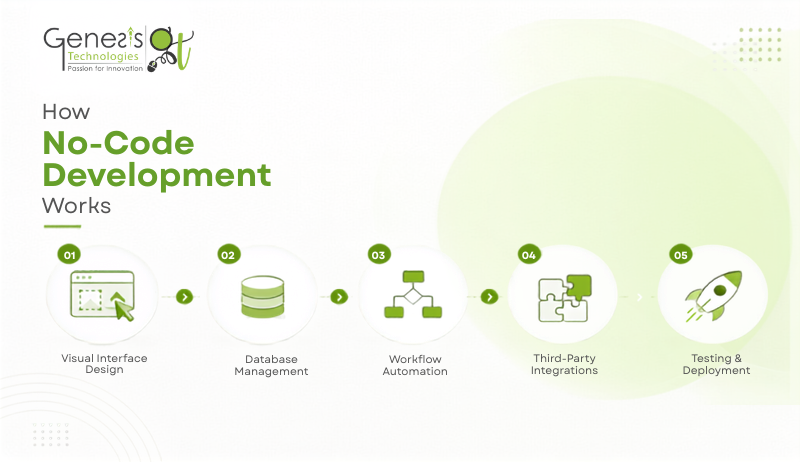
Although every no-code platform offers different features, most follow a similar development process.
Visual Interface Design
Instead of coding screens and web pages from scratch, developers create application interfaces using drag-and-drop components such as forms, buttons, tables, navigation menus, charts, and dashboards. This visual approach makes it easier to build, modify, and maintain applications while significantly reducing frontend development time.
Database Management
Every application requires a database to store and organize information. No-code platforms provide visual tools to create and manage databases without writing SQL queries or backend code.
Common types of data managed through no-code platforms include:
- Customer information
- Orders and invoices
- Employee records
- Project details
- Inventory
- Appointments
Relationships between different data sets can also be configured visually, making database management more accessible while maintaining structured information.
Workflow Automation
One of the most valuable features of no-code development is workflow automation. Businesses can define rules that automatically trigger actions when specific events occur, helping reduce repetitive manual tasks.
- A new enquiry automatically creates a lead record.
- Booking a consultation updates the sales pipeline.
- Automated follow-up emails and reminders are sent to prospects, helping improve lead nurturing and conversion.
- Signing an agreement initiates the onboarding process.
- Completing a task sends a notification to the next team member.
- Submitting a form generates a confirmation email or invoice.
Because workflows are built visually, businesses can easily modify conditions, automate new actions, or adjust process flows as requirements change without extensive redevelopment. This flexibility allows organizations to continuously optimize their operations as they grow.
Third-Party Integrations
Most organizations rely on multiple software applications to manage their operations. No-code platforms allow these systems to work together by integrating with third-party services such as CRM platforms, payment gateways, accounting software, cloud storage, communication tools, survey applications, and scheduling applications.
Instead of transferring information manually between systems, integrations enable data to flow automatically, creating a more connected and efficient digital ecosystem.
Testing and Deployment
Before an application goes live, it is tested to verify that workflows, user permissions, integrations, and business logic function correctly. Once testing is complete, the application can be deployed with minimal technical effort.
As business needs evolve, updates and improvements can often be implemented more quickly than with traditional software development, allowing organizations to continuously refine their applications without lengthy redevelopment cycles.
[Also Read: Building Scalable Multi-Tenant Integrations]
Top Benefits of No-Code Development
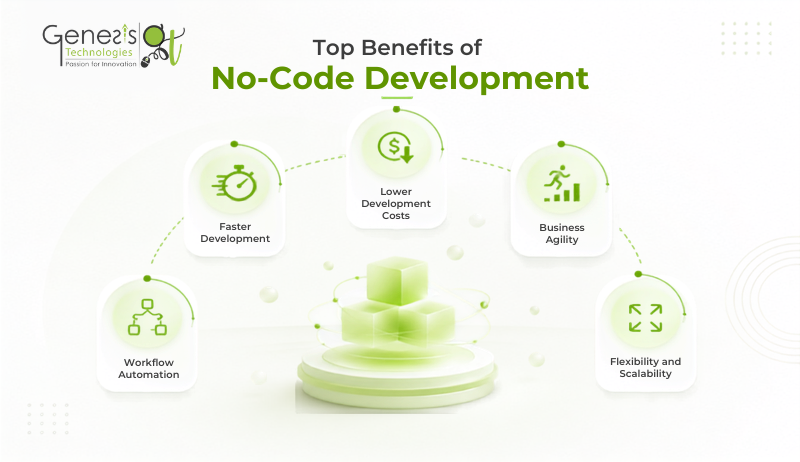
As organizations continue to embrace digital transformation, no-code development is gaining rapid adoption across industries. According to The Business Research Company, the global no-code development platforms market is projected to grow from $35.61 billion in 2025 to $102.57 billion by 2030, reflecting the increasing demand for faster and more efficient application development. Here are five key benefits of no-code development for businesses.
1. Faster Development
One of the biggest advantages of no-code development is the speed at which applications can be built. Instead of writing code from scratch, developers use visual builders, pre-built components, and automated workflows to accelerate development. This enables businesses to launch applications faster, respond to changing requirements more efficiently, and reduce project timelines.
2. Lower Development Costs
Traditional software development often requires significant investments in development resources and longer project timelines. No-code development reduces much of the manual coding effort, making it a cost-effective option for projects with well-defined requirements. Applications built using visual workflows are also easier to understand, maintain, and hand over to new team members, reducing the effort required for technical knowledge transfer.
3. Business Agility
Business requirements change over time, and applications must adapt quickly. No-code platforms make it easier to introduce new features, update workflows, and modify business processes with minimal disruption. In many cases, these changes can be deployed without significant downtime, allowing organizations to respond faster to customer feedback, market demands, and evolving business priorities.
4. Workflow Automation
No-code platforms help automate repetitive business processes by connecting applications, databases, and third-party services. Tasks such as lead management, approval workflows, customer onboarding, notifications, invoicing, and follow-up reminders can run automatically. This reduces manual effort, minimizes human error, improves operational efficiency, and helps teams focus on higher-value work.
5. Flexibility and Scalability
Many no-code platforms allow applications to grow alongside business requirements. Organizations can add new modules, integrate additional tools, support more users, and expand application functionality without rebuilding the entire solution. This flexibility enables businesses to scale efficiently while supporting long-term growth.
Common Use Cases for No-Code Development
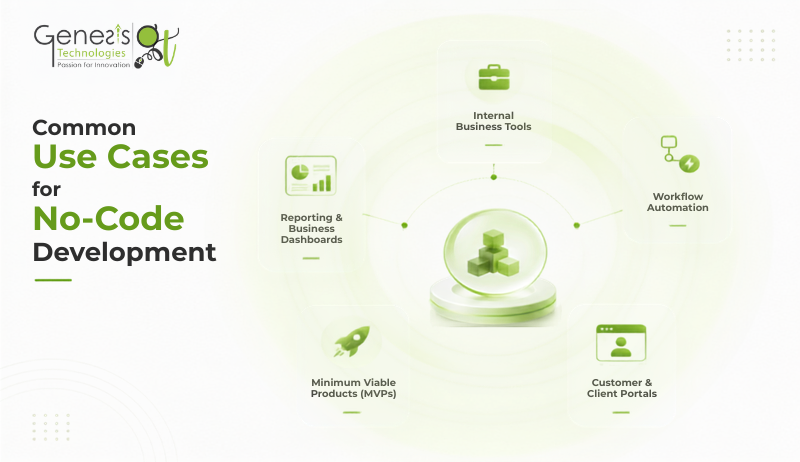
No-code development is well suited for a wide range of business applications that require rapid development, process automation, and minimal custom coding. From streamlining internal operations to validating new business ideas, organizations can use no-code platforms to solve common business challenges quickly and efficiently. Below are some of the most common use cases for no-code development.
Reporting and Business Dashboards
Businesses collect data from multiple sources, but turning that information into actionable insights can be challenging. No-code platforms make it easier to build dashboards that consolidate data and present key metrics in a clear, visual format.
Use Case: A retail business combines sales, inventory, and customer data into a single dashboard, allowing managers to monitor business performance and make faster, data-driven decisions.
Internal Business Tools
Many organizations still rely on spreadsheets, emails, or disconnected software to manage daily operations. No-code platforms can simplify these processes by creating centralized applications for employee management, leave requests, expense approvals, inventory tracking, and internal communication.
Use Case: A growing company managing employee leave requests through emails can build a no-code HR portal where employees submit requests, managers approve them, and HR automatically receives updated leave records—all within a single application.
Workflow Automation
Repetitive manual tasks consume valuable time and often lead to errors. No-code platforms allow businesses to automate workflows by creating rules that trigger actions based on specific events, helping teams work more efficiently.
Use Case: A sales team receives enquiries through its website. Instead of manually updating spreadsheets and assigning leads, a no-code workflow automatically creates a lead record, assigns it to the appropriate sales representative, sends a confirmation email, and schedules follow-up emails and reminders for both the sales team and prospective clients, helping improve lead generation and conversion.
Customer and Client Portals
No-code development is ideal for building self-service portals where customers or clients can access information, submit requests, upload documents, or track the progress of ongoing services. These portals improve the customer experience while reducing administrative workload.
Use Case: A consulting firm creates a client portal where customers can schedule meetings, upload required documents, review project updates, and download invoices without contacting the support team for every request.
Minimum Viable Products (MVPs)
Businesses often need to validate a new idea before investing in a fully customized software solution. No-code platforms enable organizations to build functional MVPs quickly, gather user feedback, and make improvements based on real-world usage.
Use Case: A startup with a new marketplace idea builds an MVP using a no-code platform to test customer demand. After validating the concept and collecting feedback, the business decides whether to continue with no-code or invest in custom software development.
When Is No-Code Development Not the Right Choice?
While no-code development offers numerous advantages, every application has unique technical, security, and scalability requirements. Understanding the limitations of no-code platforms helps businesses choose the most suitable development approach for their current needs and long-term goals.
Highly Complex Applications
Applications with sophisticated workflows, complex business rules, or specialized functionality often require custom software development. Traditional development provides greater flexibility to build features that cannot be achieved through visual configuration alone.
Large-Scale, High-Performance Systems
Applications expected to handle large volumes of users, real-time data processing, or resource-intensive operations may require a custom-built architecture optimized for performance and scalability.
Extensive Customization Requirements
While no-code platforms offer a wide range of configurable features, businesses with highly specific design, functionality, or integration requirements may find traditional development better suited to their needs.
Long-Term Technical Control
Organizations that require complete ownership of their application's source code, architecture, hosting environment, and technology stack may benefit more from custom software development. This provides greater flexibility to customize, maintain, and evolve the application as business requirements change.
Strict Data Privacy and Compliance
Businesses that handle sensitive or regulated data often have strict privacy, security, and compliance requirements. Depending on the platform, some no-code solutions may not provide the level of control needed for industries such as healthcare, finance, or government, making custom software development a more suitable choice.
Avoiding Third-Party Platform Dependency
No-code applications are typically built on third-party platforms. Organizations that require complete ownership of their application and infrastructure, or want to minimize dependency on an external platform, may be better served by custom software development. Since the application relies on the platform, service outages or platform-related issues can directly impact its availability and performance.
Is No-Code Development Right for Your Business?
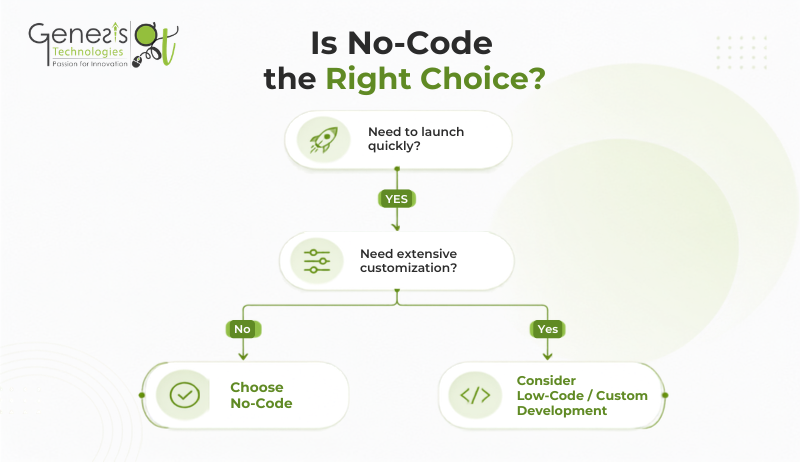
Choosing the right development approach depends on your business objectives, project scope, and long-term goals. While no-code development enables businesses to build applications quickly and cost-effectively, it's important to evaluate whether it aligns with your functional and technical requirements.
Before making a decision, consider the following questions:
- Do you need to build and launch an application quickly?
- Is your project focused on automating business processes or improving internal operations?
- Are you developing an MVP to validate a new business idea?
- Can your requirements be met through configurable features rather than extensive custom coding?
- Will your application require advanced customization or highly complex functionality in the future?
If your project prioritizes speed, efficiency, and standard business workflows, no-code development can be a practical solution. However, if your application demands complete flexibility, enterprise-scale performance, or extensive custom functionality, low-code or traditional software development may be a better choice.
Conclusion
No-code development offers businesses a faster and more efficient way to build applications, automate workflows, and support digital transformation. While it is an excellent choice for many business use cases, the right development approach depends on your project's complexity, scalability, and long-term goals.
If you're planning your next software project, evaluating your business requirements is the first step toward choosing the right solution. Whether you choose no-code, low-code, or custom software development, the best approach is one that supports your current needs while enabling future growth.
At Genesis Technologies, we help businesses evaluate their requirements and choose the most suitable solution, whether it is no-code, low-code, or custom software development. Our goal is to build scalable, reliable applications that support long-term business growth.



 Book a call