
Integrating ACH Payments & User Verification with Dwolla: A Complete Developer Guide for SaaS Platforms

Building a SaaS platform where multiple users exchange money is far more complex than simply adding a “Pay Now” button.
ACH-based payment systems introduce two critical layers: money movement and user verification — and both must work together for the platform to function correctly.
You will face challenges such as:
- Routing money between multiple merchants without the platform holding funds
- Verifying users (KYC/AML) before transactions, requiring sensitive data like name, DOB, SSN, and address
- Handling recurring payments like rent, subscriptions, or payouts
- Enforcing transaction limits for unverified users
- Managing ACH settlement timing (1–3 business days)
- Staying compliant without storing sensitive financial data directly
Traditional gateways like Stripe, PayPal, or Razorpay work well for card payments. But when bank-to-bank transfers, compliance, and multi-party flows are core to your product, you need a platform designed for ACH architecture — and that’s where Dwolla fits.
Why Dwolla?
Dwolla is an ACH-first payments API designed for developers building complex financial workflows. Unlike general payment gateways, Dwolla focuses on bank transfers, compliance, and multi-user platforms.
Key features include:
- Built-in KYC / AML verification
- ACH transfers with clear transaction limits
- Support for verified, unverified, and receive-only customers
- Clean REST APIs and SDKs
- Compliance-first design aligned with NACHA, PCI, and AML requirements
Prerequisites Before Using Dwolla
Before integrating Dwolla, make sure your system is prepared for ACH-based architecture.
Checklist:
- Create a Dwolla Master Account and obtain client_id and client_secret
- Decide how users will link bank accounts
- Micro-deposits (slower, built-in)
- Plaid (instant verification, better UX)
- Configure webhook endpoints to receive events such as customer_verified, transfer_completed, transfer_failed
- Design your onboarding flow to support asynchronous verification
ACH integrations require more upfront planning, but they enable secure, compliant, and scalable money movement.
Two-Part Implementation with Dwolla
In our integration, we used Plaid for instant bank verification, with Dwolla handling the customer creation, funding sources, and transfers.
A. User Onboarding and Verification
1. Install the Dwolla SDK
To begin using the SDK, first install it via npm (or your preferred package manager).
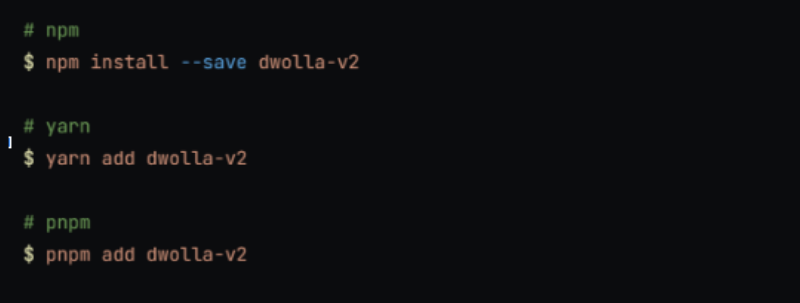
The next step in ACH systems is to verify your users. Dwolla provides APIs to create customers and run KYC automatically.
2. Initialize the Dwolla Client
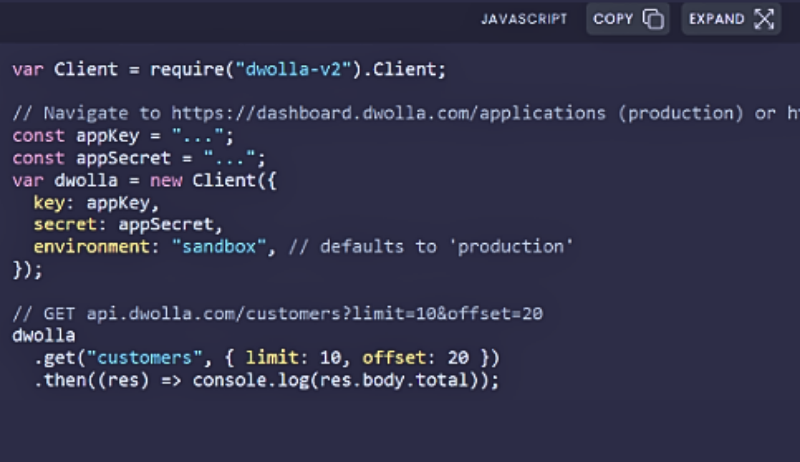
This consumes the Dwolla SDK in JavaScript, allowing your application to interact with the Dwolla API.
3. Create a Verified Customer
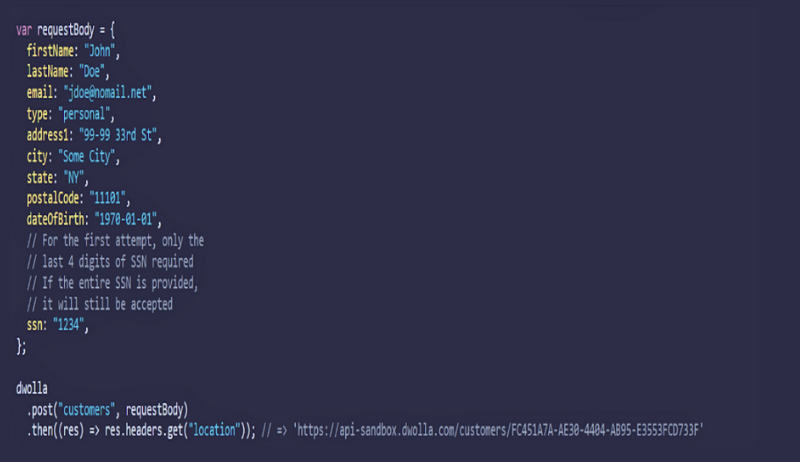
Dwolla responds with a Location URL. That URL represents the user in Dwolla’s system and is what you’ll use to check their status or initiate payments.
4. Check Verification Status

Dwolla’s verification process is asynchronous. A user may require additional documents (document) or retries (retry). Always handle these flows gracefully, often by pausing onboarding and resuming later when the user submits more info.
B. Payments and Transfers
Once a user is verified, the next step is to link their bank account and then initiate transfers.
1. Add a Funding Source
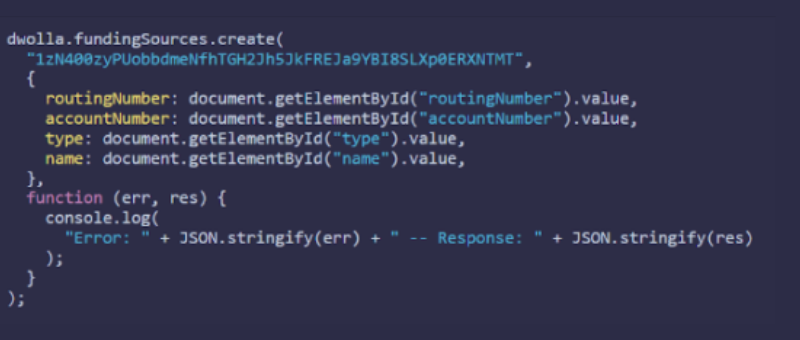
This creates a funding source (a bank account) for the customer. You can verify it either via micro-deposits or Plaid instant verification.
2. Create a Transfer
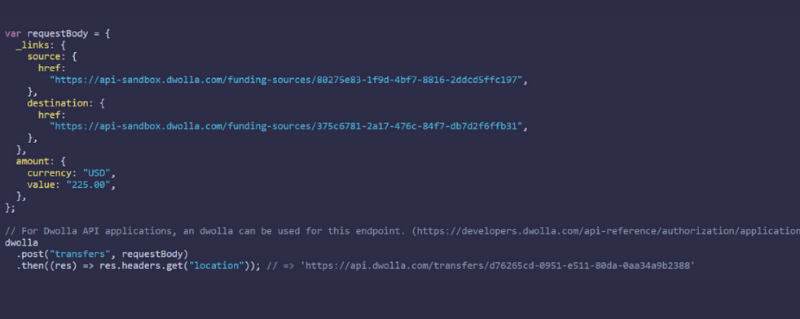
Here you specify the source and destination funding sources and the amount to transfer. Dwolla responds with a Location token for the transfer.
3. Check Transfer Status
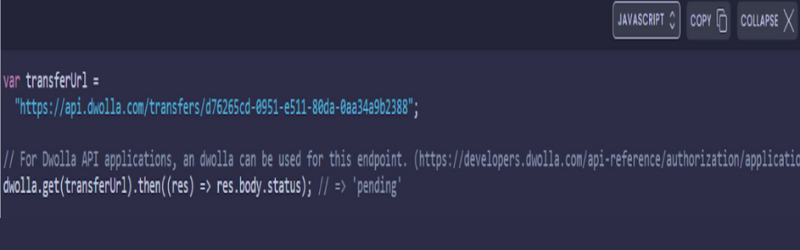
Transfers move through states, and ACH takes time. It’s best to rely on Dwolla’s webhooks (transfer_completed, transfer_failed) rather than polling.
Quick Reference: Dwolla Endpoints
The following endpoints form the core of most Dwolla integrations.
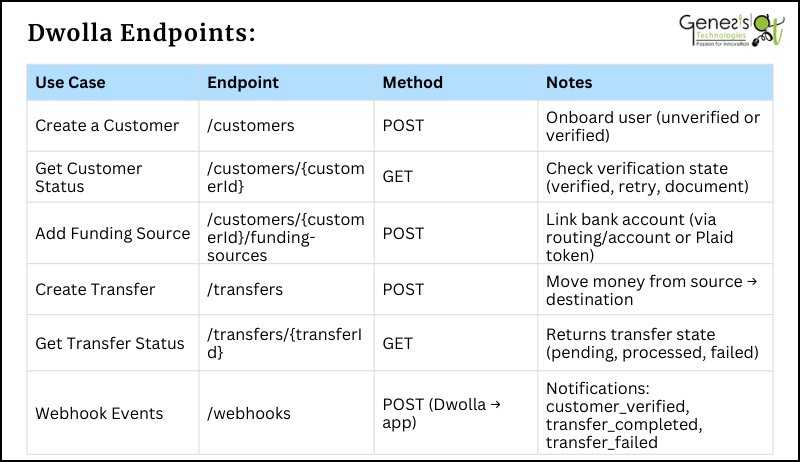
These are the minimum endpoints required for most SaaS payment flows. Depending on your use case, you may also use document upload endpoints, micro-deposit verification endpoints, or balance endpoints if enabling wallet-like functionality.
Common Issues When Integrating Dwolla (and How to Fix Them)
Even with a well-designed architecture, developers often run into recurring issues when working with Dwolla and ACH-based payment flows. Most of these problems occur because ACH transfers are asynchronous, verification is compliance-driven, and transactions may take time to settle.
Dwolla integrations are powerful but require careful handling of:
- Asynchronous verification
- ACH settlement delays
- Webhooks
- Idempotency
- Compliance limits
Below are the most common challenges and the recommended ways to handle them.
1.Verification Delays
Problem: Transactions fail or limits apply because the user is not yet verified.
Solution:
- Listen for the customer_verified webhook instead of assuming success.
- Handle document and retry statuses properly.
- Show clear UI messages like: "Verification in progress — additional documents may be required."
2.Micro-Deposit Timing
Problem: Users think bank linking failed or gets stuck during onboarding.
Solution:
- Prefer Plaid or instant verification for better UX.
- If using micro-deposits, show progress messages.
- Allow users to resume onboarding later.
3.Duplicate Transfers
Problem: Network retries or frontend resubmissions may cause the same transfer request to be sent multiple times.
Solution:
- Always send an Idempotency-Key header with every POST request.
- Store request IDs in your database.
- Validate before creating a new transfer.
4.Webhook Failures
Problem: Transfers complete but your app does not update.
Solution:
- Always respond with 200 OK within 10 seconds.
- Log every webhook request.
- Implement retry-safe handlers.
5.Tracking & Debugging Issues
Problem: Hard to trace transfers or customers later.
Solution:
- Store the Location URL for Customers, Funding sources, and Transfers.
- Log X-Request-ID for API calls.
6.ACH Returns & Failures
Problem: Transfers appear successful but later fail.
Solution:
- Listen for transfer_failed webhooks.
- Handle NACHA return codes.
- Update UI and notify users properly.
7.Unverified User Limits
Problem: Large transfers fail without clear error messages.
Solution:
- Always check customer verification status.
- Upgrade users to verified accounts before high-value transfers.
- Show limit warnings in UI.
8.User Confusion During Onboarding
Problem: Users abandon onboarding.
Solution:
- Show status messages like Bank linked, Verification pending, Transfer processing.
- Avoid silent waiting states.
- Use webhooks to update UI in real time.
9.Network Errors & Timeouts
Problem: API calls may fail due to temporary network issues.
Solution:
- Implement retry logic with exponential backoff.
- Make transfer creation idempotent.
- Log all failed requests.
Our Use Case: Rental Management SaaS
We integrated Dwolla into a rental management SaaS platform to automate rent collection and payouts.
- Tenants: Unverified accounts with verified funding sources for secure payments.
- Landlords: Verified accounts to receive direct payouts.
- Vendors: Receive-only accounts for maintenance services.
- Recurring transfers: Automatic monthly debits and credits without holding funds.
- Bank linking: Plaid integration for instant verification; micro-deposits as fallback.
- Webhooks: Real-time dashboard updates on transaction status.
This setup provides a compliance-first, automated system that enhances the experience for tenants and landlords.
From Dwolla Integration to Full-Scale SaaS Development
Our experience with Dwolla demonstrates how the right architecture can simplify ACH payments, user verification, and compliance workflows.
At Genesis Technologies, we specialize in building complex, integration-heavy platforms, including:
- Payment gateway and ACH integrations
- Secure, compliance-ready workflows (finance, healthcare, logistics)
- Cloud-native SaaS platforms
- Automation and API-driven systems
- Third-party integrations (Plaid, Dwolla, Stripe, Salesforce, etc.)
Whether you're building a payment platform, automation tool, or enterprise SaaS product,
Need help with ACH, payments, or API integrations?
Talk to Our Team




 Book a call